Introducing Dokku UI: A Modern Web Interface for Dokku Server Management
After years of managing Dokku deployments via SSH and command-line tools, I finally got tired of typing the same commands over and over. So I built something better.
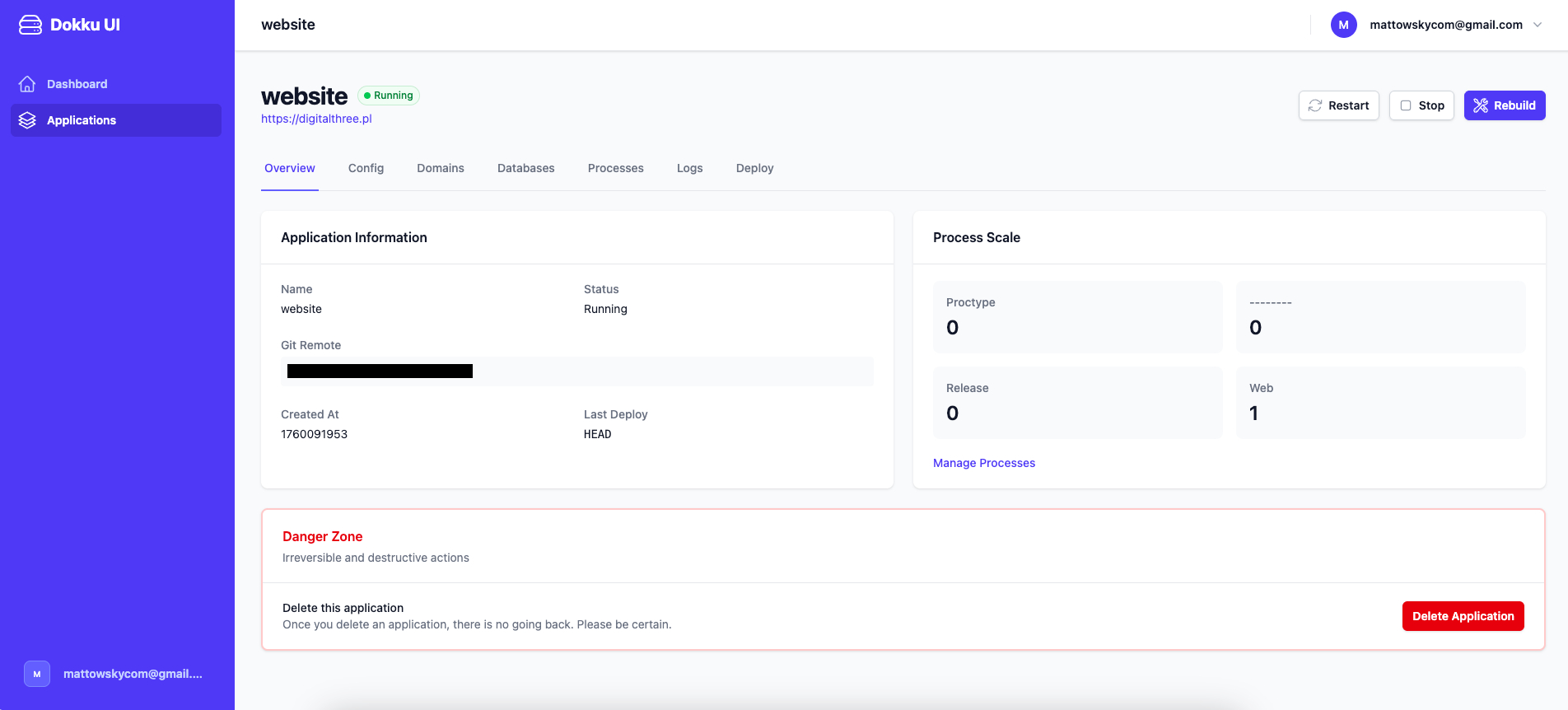
Dokku UI is an open-source web interface for managing Dokku applications. It's built with Rails 8, Hotwire, and Tailwind CSS – and it makes managing your Dokku server actually enjoyable.
Why I Built This
If you've used Dokku, you know the drill:
# SSH into server
ssh dokku@yourserver.com

# Check apps
dokku apps:list

# View logs
dokku logs myapp -t

# Set config
dokku config:set myapp DATABASE_URL=postgres://...

# Add domain
dokku domains:add myapp www.example.com

# Enable SSL
dokku letsencrypt:enable myapp

# Restart
dokku ps:restart myapp
It works. But it's tedious.
Especially when you're managing multiple apps. Or when you need to quickly check logs. Or when a non-technical team member needs to set an environment variable.
I wanted a web UI that:
- Doesn't require SSH – just open a browser
- Shows everything at a glance – apps, domains, databases, all visible
- Makes common tasks one-click – restart app, view logs, set variables
- Is simple to deploy – it's just a Rails app, deploy it on Dokku itself
So I built it.
What It Does
Application Management
The dashboard shows all your Dokku apps with their status, domains, and running processes. From there, you can:
- Create new apps with one click
- Delete apps (with confirmation, of course)
- Restart, stop, or rebuild any app instantly
- View deployment info – when it was deployed, by whom, what commit
No more dokku apps:list followed by dokku ps:restart followed by hoping you typed the app name correctly.
Environment Variables
This was the killer feature for me. Setting config variables via CLI is painful:
dokku config:set myapp \
  DATABASE_URL=postgres://... \
  REDIS_URL=redis://... \
  SECRET_KEY_BASE=abc123... \
  AWS_ACCESS_KEY=... \
  # ... 15 more variables
```

With Dokku UI? There's a form. Add, edit, delete variables. Bulk import from `.env` file. Export to `.env` format.

**Game changer** when onboarding new team members or debugging config issues.

### Domains & SSL

Managing domains visually is so much better than command-line:

- See all domains for an app at a glance
- Add new domains with a form (no typos)
- Enable Let's Encrypt SSL with one click
- See SSL status and expiry dates

Before, I'd forget which apps had SSL enabled. Now it's right there in the UI.

### Database Management

Creating and linking PostgreSQL databases is now point-and-click:

- Create new database
- Link to app (automatically sets DATABASE_URL)
- View connection info
- Destroy database (with scary warning)

No more Googling "dokku postgres create command" every time.

### Real-time Logs

This is my favorite feature. Click "View Logs" and you get:

- **Real-time streaming logs** (powered by Turbo Streams)
- **Syntax highlighting** for errors and warnings
- **Auto-scroll** to latest (toggleable)
- **Filter by process type** (web, worker, etc.)

Previously, I'd SSH in, run `dokku logs myapp -t`, and keep that terminal open. Now I just open a browser tab.

### Process Scaling

See how many dynos are running for each process type:
```
web: 2
worker: 1
scheduler: 1
Scale up or down with a form. No more dokku ps:scale myapp web=3.
How It Works
Dokku UI is just a Rails app that executes Dokku commands under the hood. When you click "Restart app", it runs:
system("dokku ps:restart #{app_name}")
Simple, right?
Two deployment modes:
1. Local Mode (Recommended)
Deploy Dokku UI as a Dokku app on the same server it's managing. Commands execute locally. Fast, simple, no SSH complexity.
# On your Dokku server
dokku apps:create dokku-ui
dokku config:set dokku-ui DOKKU_NO_SUDO=true

# From local machine
git push dokku main
Done. Your Dokku instance now has a web UI.
2. SSH Mode
Run Dokku UI anywhere and connect to Dokku via SSH. Useful if you want to manage multiple Dokku servers from one dashboard.
dokku config:set dokku-ui \
  DOKKU_SSH_HOST=yourserver.com \
  DOKKU_SSH_USER=dokku
Dokku UI will SSH in and run commands remotely.
Tech Stack Decisions
I built this with Rails 8, Hotwire, and Tailwind CSS – the same stack I've been praising in my recent posts about modern Rails.
Why Rails?
Because Dokku UI is a classic CRUD app with some real-time features. Rails excels at this. I didn't need React. I didn't need a separate API. Just Rails doing what it does best.
Why Hotwire?
- Turbo Frames for updating parts of the page (app status, process counts)
- Turbo Streams for real-time logs
- Stimulus for interactive bits (confirm dialogs, form validation)
The entire app is 500 lines of JavaScript. Mostly Stimulus controllers. No build step (thanks import maps). No webpack. No npm hell.
Why Tailwind?
Because I wanted it to look good without writing a ton of custom CSS. Tailwind's utility classes made it trivial to build a clean, responsive UI.
Plus, Rails 8 has Tailwind built-in. Just works.
Why SQLite?
For simplicity. Dokku UI stores:
- User sessions
- Cached app data
- Audit logs
That's it. No complex relational data. SQLite is perfect.
If you're managing 100+ apps and need something more robust, swap it for PostgreSQL. But for most use cases? SQLite is plenty.
Security Considerations
Running a web UI with server admin access is sensitive. Here's how Dokku UI handles security:
1. Authentication Required
Devise-based authentication. No endpoints are accessible without login.
2. Rate Limiting
Rack::Attack prevents brute-force login attempts:
- 5 failed logins = 5-minute lockout
- 20 requests/minute per IP
3. HTTPS Enforced
In production, HTTPS is required. Set up Let's Encrypt:
dokku letsencrypt:enable dokku-ui
4. Minimal Privileges
Run as the dokku user, not root. The app only has permissions to execute Dokku commands, nothing else.
5. Audit Logging
All destructive actions (delete app, destroy database) are logged with timestamp and user.
6. Optional IP Whitelisting
Want to restrict access to your office IP? Add middleware:
# config/application.rb
config.middleware.insert_before 0, Rack::Auth::IPWhitelist, ["1.2.3.4"]
Why Open Source?
I'm releasing this as open source (MIT license) for a few reasons:
1. Dokku is open source
It felt right to give back to the ecosystem. Dokku is an amazing project. If this UI makes Dokku easier to use, everyone wins.
2. I learn from open source
Every open source project I've contributed to made me a better developer. Maybe someone will submit a PR that teaches me something new.
3. Community contributions make it better
I built the features I needed. But I'm sure others need different things:
- Multi-server management
- User permissions (multiple admins with different access levels)
- Metrics and monitoring
- Integration with CI/CD
If the community wants these features, they can build them. Or suggest them. Or fund them.
4. Transparency builds trust
You can read the code. You can see exactly what commands it's running. No hidden behavior. No telemetry. No surprise data collection.
If you're giving a web app access to your server, you should be able to audit it.
Roadmap
This is version 1.0. It does what I need. But there's room to grow:
Planned features:
- Multi-server support – manage multiple Dokku servers from one UI
- User roles – read-only users, app-specific permissions
- Metrics – CPU, memory, request rates (integrate with Dokku's built-in metrics)
- Backup management – schedule and restore backups
- Buildpack selection – choose buildpack from UI instead of
.buildpacksfile - Docker image deploys – not just git push, but deploy from Docker registry
Maybe features:
- Mobile app – native iOS/Android apps (using Turbo Native)
- Webhooks – trigger builds from GitHub/GitLab
- Notifications – Slack/Discord alerts for deploys, errors
- Cost tracking – if you're on DigitalOcean/AWS, show monthly costs per app
But I'm shipping v1.0 first. Get feedback. See what people actually use. Iterate.
I built Dokku UI because I was tired of SSH-ing into servers to run basic commands. It scratched my itch. Maybe it'll scratch yours too.
If you use Dokku and you've ever thought "I wish there was a web UI for this" – this is it.
It's not perfect. It's not feature-complete. But it works, it's open source, and it makes managing Dokku significantly more pleasant.
Give it a try. Open an issue. Submit a PR. Or just star the repo if you think it's cool.
Happy deploying!